Schedule quality
Insights
The 25 diagnostic checks, what each finds and what to do about it.
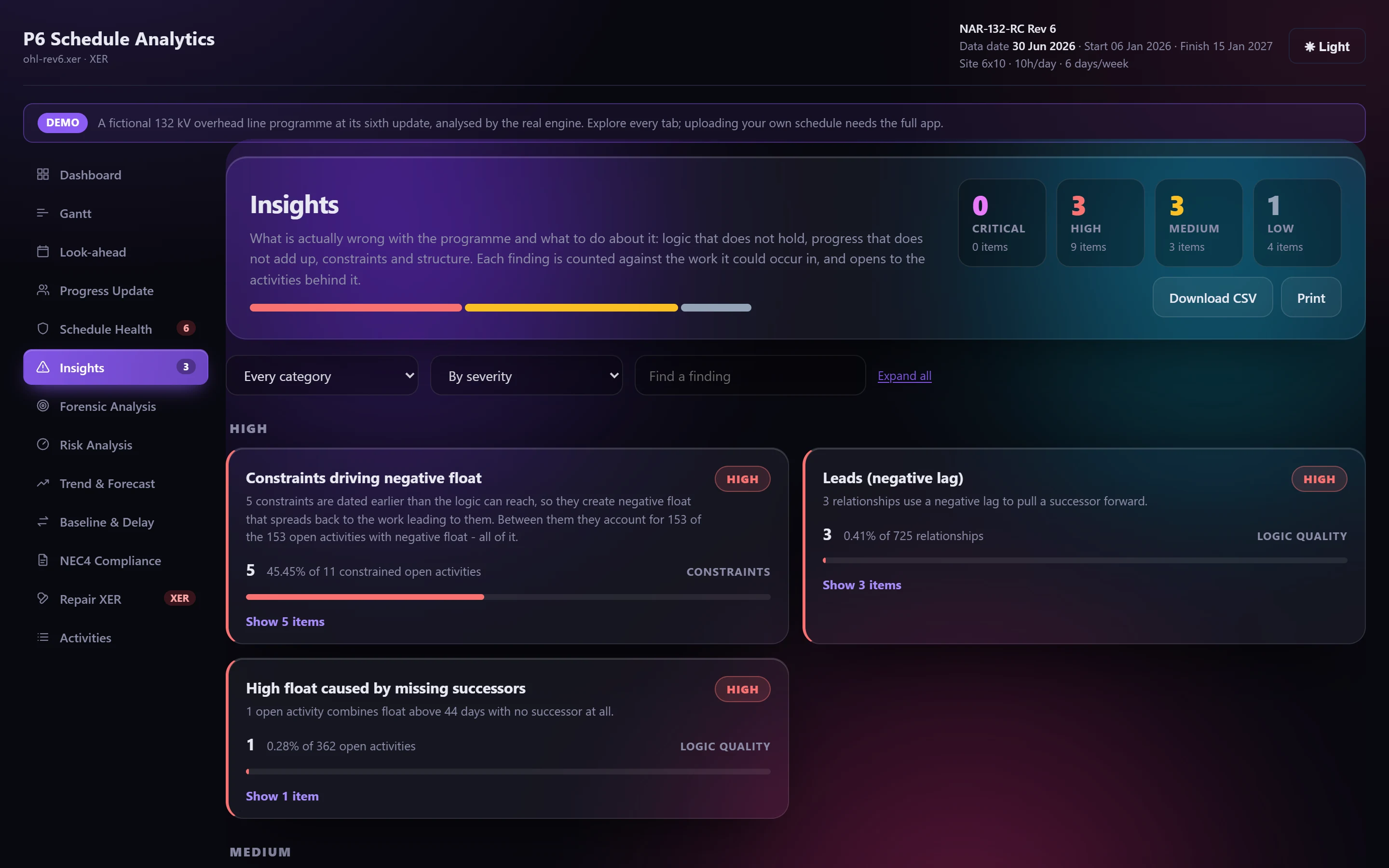
Where the DCMA assessment asks whether the programme passes a standard, Insights asks what is actually wrong with it and what to do. It runs 25 independent checks. Each finding carries a severity, its evidence and a recommendation.
Reading a finding#
- Severity: critical, high, medium or low. Findings are sorted by severity, then by count.
- Count and population: a finding is counted against the population it could occur in, and says which, for example "14 of 858 open activities" or "89 of 4,318 FS relationships". A percentage is never taken over work that couldn't have failed.
- Evidence: the screen shows the first 50 rows and can load the rest. The CSV and the Excel workbook carry every row.
- Recommendation: what to change, and where the Repair XER tab can do it for you.
The checks#
Logic
- Out-of-sequence progress, and work recorded out of sequence that has since finished.
- Duplicate relationships, and an SS or FF beside an FS that already implies it.
- Self-referencing and circular logic.
- Redundant relationships: an FS link another FS path already implies.
- Merge hotspots, counting only predecessors still open.
- Dangling logic: a start or finish nothing controls.
- Lags across calendars with different working weeks.
- Leads, and long lags hiding real work.
Progress
- Progress claimed without an actual start, and work finished without ever starting.
- Completed work still holding remaining duration.
- Work started but showing zero progress, or in progress with no remaining duration.
- Work running well over its planned duration, measured on its own calendar.
- Actual dates in the future.
Structure
- Milestones with duration, and zero-duration tasks.
- Duplicate activity IDs.
- Activities outside the WBS.
Constraints and float
- Constraints driving negative float. Only constraints that bound late dates are blamed, and each one's share of the programme's negative float is given. "On or after" constraints never create negative float.
- High float caused by missing successors.
Resources
- Remaining work with no resources or cost. A programme that's barely loaded gets one note, not a defect per activity.
Fixing what it finds#
Six findings link straight to a fix in Repair XER: duplicate relationships, self-referencing logic, redundant relationships, dangling logic, and out-of-sequence logic in open and finished work.